








The BINDER24 app adds exceptional new features
Even more personalised and practical
Good news for swimming enthusiasts: the BINDER24 app they know and love now offers three new features. After updating, users will be able to share training programmes and personalise the app even further.
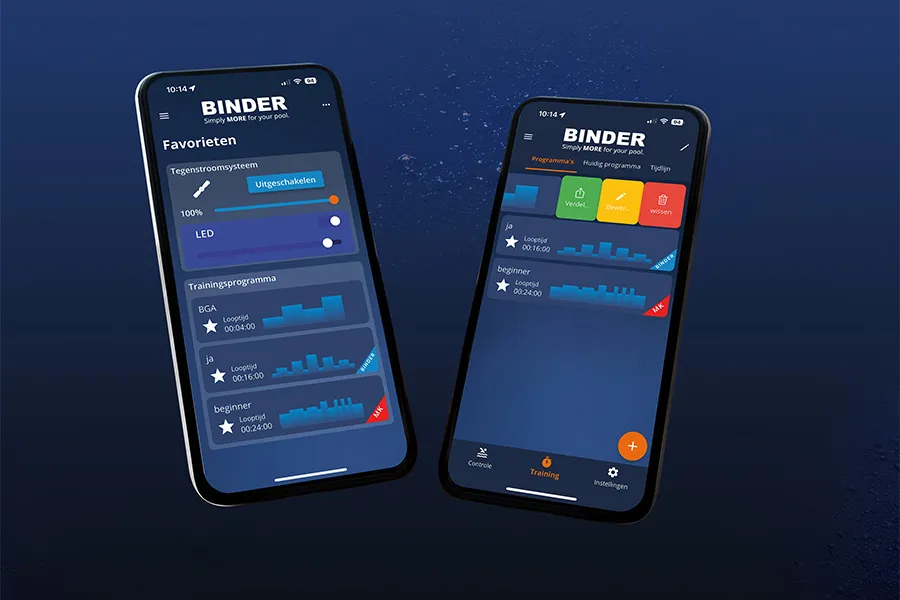
BINDER is launching a new version of its BINDER24 app. One of the key new features is the ability to create favourites: users can now select each control individually, allowing them to personalise the app’s home screen. To change the order of the blocks and the controls they contain, simply drag and drop them.
Another new feature makes it quick and easy to share training programmes with other swimmers using a QR code. To do so, person 1 taps “Share” next to the programme they want, and a QR code appears on their device. Person
2, who wants to load the programme onto their mobile device, then taps the “Plus” symbol on the training page in their BINDER24 app and selects “Import a programme” from the menu.
Person 2’s device camera is activated, allowing them to scan the QR code displayed on person 1’s mobile device. The selected programme then appears in person 2’s profile.
It is also easy to share several training sessions at once: person 1 taps the “Pencil” symbol in the top-right corner of the training page. The menu appears, and person 1 can then select the training programmes they want to share or save. Next, person 1 taps “Share” in the top-left corner of the drop-down menu. They then tap the “OK” button, which opens the device’s “Share” menu.
In the menu, person 1 can choose either to send the file they have created to another person, for example by email or WhatsApp, or to save it on their mobile phone.
To import the programmes, person 2 must open the file using the BINDER24 app. To do this, they simply tap the file and select the BINDER24 app to open it. By the way, the “Share” feature can also be used to save training sessions on the device.
Finally, the BINDER24 app update will make it easier to switch between systems. The app now saves the connection details of every counter-current swimming unit it has connected to successfully in the past. They can therefore be put into operation with a single tap.
Een zakelijke vraag aan BINDER? Get in touch
Companies in this story

Keep following this
Get an email when a new story is published. No account needed.
- ThemePool equipment automation
- SubjectNews
- CompanyBINDER